Rockville
RDAC5
RDAC5
Digital-to-Analog Converter With Headphone Amp, USB/Optical/Coaxial Inputs, RCA Output, USB Cable, Power Adapter
Free Shipping
Features
- Converts USB, optical, or coaxial digital audio to analog RCA output
- Built-in headphone amplifier supports high-impedance headphones
- Headphone and speaker outputs can play at the same time
- Plug-and-play USB playback requires no downloads or extra drivers
- Includes USB interface cable and power adapter
Couldn't load pickup availability
What's Included in the box
- DAC with built-in headphone amplifier
- USB interface cable
- Power adapter
SKU: SKU: RDAC5S
View full details


Product Details
Features
-
Connect Multiple Digital Sources
USB, optical, and coaxial inputs accept audio from a computer, TV, or compatible digital source, while RCA output feeds an amplifier or powered speakers.
-
Use Headphones and Speakers Together
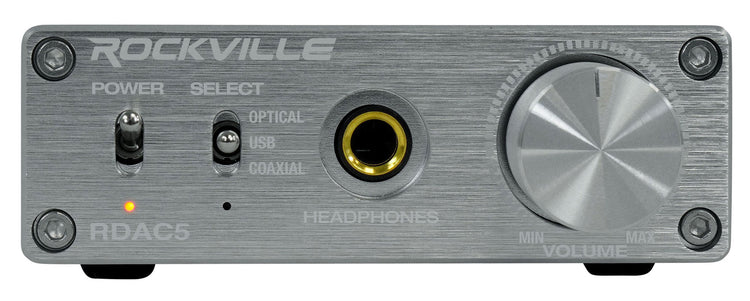
A built-in headphone amplifier supports high-impedance headphones, and the headphone and speaker outputs can run at once for simultaneous personal and room listening.
-
Adjust Headphone Listening Level
A dedicated monitor volume control adjusts headphone level, giving listeners a local control point when using the built-in amplifier with high-impedance headphones.
-
Start Computer Playback Without Extra Software
Plug-and-play USB audio needs no additional downloads or drivers, and bit depth and sampling frequency can be selected in the computer's settings.
-
Check Supported Audio Formats
Digital input accepts 16-24 bit word widths; 176.400kHz and 192kHz are listed for 16-bit input only, helping set accurate source playback.
Technical Specifications
- Product Type Digital-to-Analog Converter with Headphone Amplifier
- Digital Inputs USB, Optical, Coaxial
- Analog Output RCA
- Headphone Output Yes
- Supported Digital Input Word Widths 16-24 bit
- Digital Input Sampling Frequencies 32kHz, 44.1kHz, 48kHz, 88.2kHz, 96kHz, 176.400 kHz (16-bit only), 192 kHz (16-bit only)
- Frequency Response 5Hz to 48kHz (±0.1dB)
- THD @ 1kHz, 0dBFS <0.0142% (24-bit)
- THD @ 1kHz, -10dBFS <0.0125% (24-bit)
- THD @ 20kHz, 0dBFS <0.0625%
- Signal-to-Noise Ratio 106dB
- Total Correlated Jitter <130ps
- Crosstalk @ 1kHz <-130dB
- Crosstalk @ 20kHz <-112dB
- Output Impedance <50 ohms
- Max Output Level (Unbalanced RCA) 1.7V RMS
- Max Power Consumption 5W
- Color Silver
- Weight 1.08 lb
- Dimensions 6.49" x 3.77" x 1.37"
Support
-
User Guide
Owner's Manual
Connect your TV’s optical audio output to the RDAC5’s optical input, then select Optical on both devices. Run RCA cables from the DAC to a receiver, amplifier, or powered speakers. Optical and RCA cables are sold separately.
Yes. The RDAC5 supports plug-and-play USB playback on Mac and Windows without additional drivers. Connect the included USB cable and power adapter, select USB mode, and choose the RDAC5 as your computer’s audio output. Adjust playback format in Windows sound settings or Mac Audio MIDI Setup.
No. Connect passive speakers to a separate amplifier or receiver, then connect that amplifier or receiver to the RDAC5’s RCA outputs. Powered speakers with RCA inputs can connect directly because they have their own amplification.
Yes. The RDAC5’s headphone and RCA outputs can play simultaneously. Connect headphones to the front ¼-inch jack and your speaker system to the rear RCA outputs. The front volume knob adjusts headphone listening level.
Yes. The RDAC5 includes a built-in headphone amplifier that supports high-impedance headphones, plus a front-panel headphone volume control. Connect your headphones through the ¼-inch output. A specific supported impedance range is not published, so check compatibility before buying for a particular headphone model.
Check that the included power adapter is connected, the unit is switched on, and the input selector matches your connection: USB, optical, or coaxial. For computer playback, select the RDAC5 as the audio output. For headphones, also check the front volume knob.
The package includes the RDAC5 digital-to-analog converter with built-in headphone amplifier, a USB interface cable, and a power adapter. Optical and RCA cables are sold separately, so add the cables needed for your TV, receiver, amplifier, or powered-speaker connection.
How To Set Up Your RDAC5